
Sorcerian Original (Chinesisch)
Sie verwenden Safari. Für eine korrekte Funktion wird nur Safari auf dem neuesten macOS 27 Golden Gate oder iOS 27 unterstützt.
Sie verwenden Firefox. Nur die neueste Version von Firefox wird unterstützt.
Geben Sie in Firefox 'about:config' ein, suchen Sie nach 'javascript.options.wasm_js_promise_integration', setzen Sie den Wert auf true und aktualisieren Sie diese Seite für optimale Leistung.
Geben Sie in Firefox 'about:config' ein, suchen Sie nach 'javascript.options.wasm_js_promise_integration', setzen Sie den Wert auf true und aktualisieren Sie diese Seite für optimale Leistung.
Installieren und verwenden Sie für die beste Erfahrung die neueste Version von Chrome oder Edge.
Das Speicherlimit Ihres Browsers ist niedrig; möglicherweise kann das Spiel nicht korrekt geladen werden.
Belegt: Verfügbar:
Belegt: Verfügbar:
Um uns zu helfen, deaktivieren Sie bitte Ihren Werbeblocker für unsere Website. Das Spiel startet in Sekunden.
Werden Sie Gold-Mitglied, um eine werbefreie Nutzung zu genießen, Cloud-Speicher freizuschalten, Spiele mit LAN-Mehrspielermodus über ein virtuelles LAN mit Freunden zu spielen und uns bei Verbesserungen zu unterstützen.
Einige animierte Anzeigen können die Spielleistung beeinträchtigen. Wenn das Spiel ruckelt, schließen Sie die Anzeigen.
Einige animierte Anzeigen können die Spielleistung beeinträchtigen. Wenn das Spiel ruckelt, schließen Sie die Anzeigen.
- Datenrate: ↓ — ↑ —
- Daten gesamt: ↓ — ↑ —
- Verbindungsqualität: Warte auf Verbindung
Lädt...
🛈Windows-Spiele benötigen aktuelle Desktop- und Smartphone-CPUs für eine optimale Erfahrung. Weitere Details finden Sie auf der Hilfeseite.
Sorcerian Original (Chinesisch) (2000)
Sorcerian Original (Chinese)
Falcom


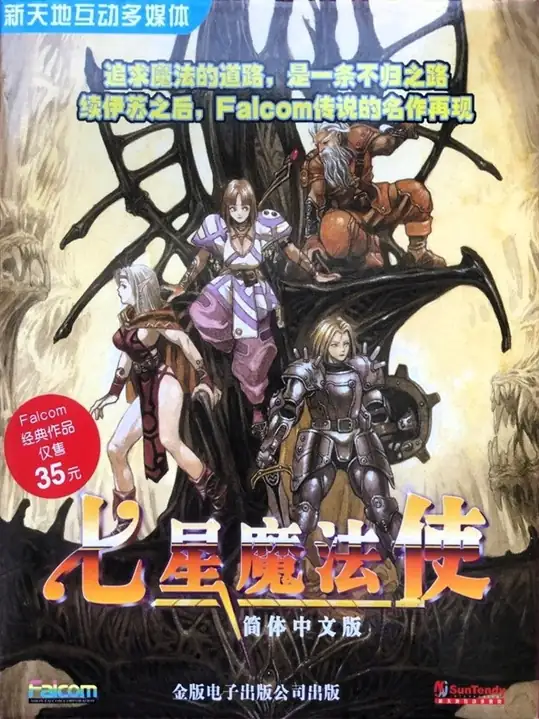
Sorcerian Original ist ein von Nihon Falcom im Jahr 2000 in Japan veröffentlichter Windows-Remake. Es ist eine modernisierte Neubearbeitung des ursprünglichen Sorcerian (1987) und stellt die klassischen, szenariobasierten Action-RPG-Inhalte für Windows wieder her und remastert sie (Gruppe mit bis zu vier Charakteren, modulare Szenarien, Charakterentwicklung sowie Magie- und Gegenstandssysteme). Das Paket soll die 15 klassischen Szenarien des Originals mit aktualisierter Grafik, Ton und Benutzeroberfläche nachbilden.
Netzwerkspiel
Server werden geladen…
Räume für dieses Spiel
Räume werden geladen…
Es gibt noch keine Räume. Erstelle einen, um loszulegen.
Deine Netzwerkverbindung wird vorbereitet…
Speicherdatei hochladen
Das Hochladen einer Speicherdatei überschreibt den aktuellen Fortschritt und startet das Spiel neu. Möchten Sie fortfahren?
Warnung
Willkommen
Speichere zuerst im Spiel. Öffne es beim nächsten Mal auf demselben Gerät im selben Browser, wähle Spiel fortsetzen und lade deinen Spielstand im Spiel. Beim ersten Besuch heißt die Option Neu beginnen.
Cloud-Spielstände und danach Browser-Spielstände werden zuerst ausgewählt. Wähle Spiel fortsetzen, um mit deinem letzten Fortschritt hier weiterzuspielen. Das Laden eines Spielstands bringt dich zum gespeicherten Zeitpunkt zurück.
Mit den Schaltflächen über dem Spiel kannst du außerdem eine Sicherung anlegen:
 Speichere in der Cloud und nutze den Spielstand nach der Anmeldung auch auf einem anderen Gerät. Nur für Gold-Mitglieder.
 Speichere in diesem Browser. Wähle beim nächsten Mal Browser in der Spielstandliste, um den Spielstand zu laden.
 Lade eine Spielstanddatei herunter. Wähle beim nächsten Mal Hochladen, um sie zu laden.
Diese Sicherungen werden erst beim erneuten Speichern aktualisiert. Warte, bis das Speichern oder Herunterladen abgeschlossen ist, bevor du die Seite schließt.
Beim Löschen der Daten dieser Website können dein Fortschritt hier und deine Browser-Spielstände verloren gehen. Sichere wichtige Spielstände in der Cloud oder lade sie herunter.
Warte nach dem Beenden des Spiels, bis das Herunterfahren abgeschlossen ist. Sichere dann deinen Spielstand und schließe die Seite.
Cloud-Spielstände und danach Browser-Spielstände werden zuerst ausgewählt. Wähle Spiel fortsetzen, um mit deinem letzten Fortschritt hier weiterzuspielen. Das Laden eines Spielstands bringt dich zum gespeicherten Zeitpunkt zurück.
Mit den Schaltflächen über dem Spiel kannst du außerdem eine Sicherung anlegen:
Speichere in der Cloud und nutze den Spielstand nach der Anmeldung auch auf einem anderen Gerät. Nur für Gold-Mitglieder. Speichere in diesem Browser. Wähle beim nächsten Mal Browser in der Spielstandliste, um den Spielstand zu laden. Lade eine Spielstanddatei herunter. Wähle beim nächsten Mal Hochladen, um sie zu laden.Diese Sicherungen werden erst beim erneuten Speichern aktualisiert. Warte, bis das Speichern oder Herunterladen abgeschlossen ist, bevor du die Seite schließt.
Beim Löschen der Daten dieser Website können dein Fortschritt hier und deine Browser-Spielstände verloren gehen. Sichere wichtige Spielstände in der Cloud oder lade sie herunter.
Warte nach dem Beenden des Spiels, bis das Herunterfahren abgeschlossen ist. Sichere dann deinen Spielstand und schließe die Seite.
Nicht erneut anzeigen.
Wichtiger Aktualisierungshinweis
Für kürzere Ladezeiten und ein besseres Spielerlebnis haben wir die Systemarchitektur umfassend überarbeitet. Daher werden die für das Spiel benötigten Dateien erneut heruntergeladen. Bitte haben Sie etwas Geduld.