
Sorcerian Original (versión china)
Estás usando Safari. Solo Safari en macOS 27 Golden Gate o iOS 27 funciona correctamente.
Estás usando Firefox. Solo se admite la versión más reciente de Firefox.
Introduce 'about:config' en Firefox, busca 'javascript.options.wasm_js_promise_integration', cambia su valor a true y actualiza esta página para obtener un rendimiento óptimo.
Introduce 'about:config' en Firefox, busca 'javascript.options.wasm_js_promise_integration', cambia su valor a true y actualiza esta página para obtener un rendimiento óptimo.
Instala y usa la versión más reciente de Chrome o Edge para obtener la mejor experiencia.
La cuota de almacenamiento del navegador es baja y puede que no puedas cargar el juego correctamente.
Uso: Disponible:
Uso: Disponible:
Para ayudarnos a mejorar, desactiva el bloqueador de anuncios en nuestro sitio. El juego empezará en segundos.
Hazte miembro Gold para disfrutar de una experiencia sin anuncios, desbloquear el guardado en la nube, jugar con tus amigos a juegos compatibles con multijugador en LAN a través de una LAN virtual y ayudarnos a mejorar.
Algunos anuncios animados pueden afectar al rendimiento del juego. Si el juego va a tirones, cierra los anuncios.
Algunos anuncios animados pueden afectar al rendimiento del juego. Si el juego va a tirones, cierra los anuncios.
- Velocidad: ↓ — ↑ —
- Tráfico total: ↓ — ↑ —
- Calidad de red: Esperando conexión
Cargando...
🛈Los juegos de Windows requieren las CPU más recientes de equipos de escritorio y teléfonos móviles para una experiencia óptima. Consulta la página de ayuda para más detalles.
Sorcerian Original (versión china) (2000)
Sorcerian Original (Chinese)
Falcom


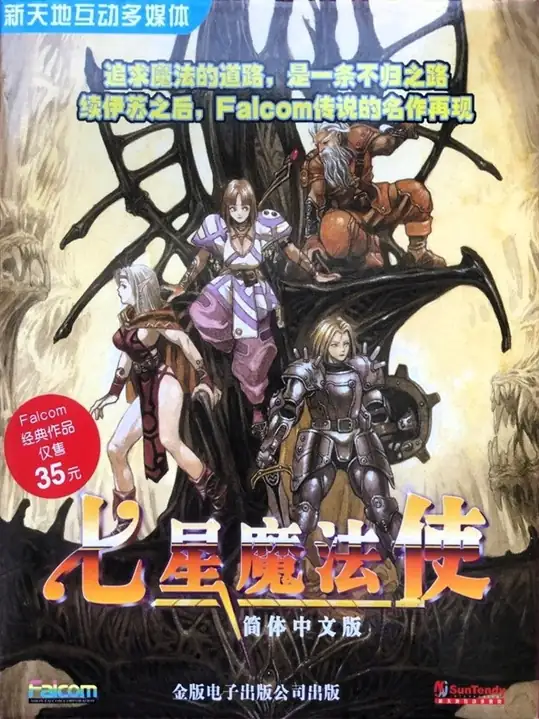
Sorcerian Original — un remake para Windows publicado por Nihon Falcom en 2000 en Japón. Es una reelaboración modernizada del Sorcerian original de 1987, que restaura y remasteriza para Windows el contenido clásico de acción-RPG basado en escenarios: grupo de hasta cuatro personajes, escenarios modulares, crecimiento de personajes y sistemas de magia y objetos. El paquete busca reproducir los 15 escenarios clásicos del original con gráficos, sonido e interfaz actualizados.
Juego en red
Cargando servidores…
Salas para este juego
Cargando salas…
Todavía no hay salas. Crea una para empezar.
Preparando tu conexión de red…
Subir archivo de guardado
Subir un archivo guardado sobrescribirá el progreso actual y reiniciará el juego. ¿Quieres continuar?
Advertencia
Bienvenido
Guarda primero dentro del juego. La próxima vez, abre el juego en el mismo dispositivo y navegador, elige Continuar partida y carga tu partida dentro del juego. En la primera visita, la opción se llama Empezar de nuevo.
Se seleccionan primero las partidas de la nube y después las del navegador. Elige Continuar partida para seguir con tu último progreso aquí. Cargar una partida te devuelve al momento en que se guardó.
También puedes hacer una copia de seguridad con los botones que hay encima del juego:
 Guarda en la nube y úsala en otro dispositivo después de iniciar sesión. Solo para miembros Gold.
 Guarda en este navegador. La próxima vez, elige Navegador en la lista de partidas para cargarla.
 Descarga un archivo de partida guardada. La próxima vez, elige Subir para cargarlo.
Estas copias solo se actualizan cuando vuelves a guardar. Espera a que termine el guardado o la descarga antes de cerrar la página.
Borrar los datos de este sitio puede hacer que pierdas tu progreso aquí y las partidas del navegador. Guarda las partidas importantes en la nube o descarga una copia.
Después de salir del juego, espera a que termine de apagarse; luego haz una copia de tu partida y cierra la página.
Se seleccionan primero las partidas de la nube y después las del navegador. Elige Continuar partida para seguir con tu último progreso aquí. Cargar una partida te devuelve al momento en que se guardó.
También puedes hacer una copia de seguridad con los botones que hay encima del juego:
Guarda en la nube y úsala en otro dispositivo después de iniciar sesión. Solo para miembros Gold. Guarda en este navegador. La próxima vez, elige Navegador en la lista de partidas para cargarla. Descarga un archivo de partida guardada. La próxima vez, elige Subir para cargarlo.Estas copias solo se actualizan cuando vuelves a guardar. Espera a que termine el guardado o la descarga antes de cerrar la página.
Borrar los datos de este sitio puede hacer que pierdas tu progreso aquí y las partidas del navegador. Guarda las partidas importantes en la nube o descarga una copia.
Después de salir del juego, espera a que termine de apagarse; luego haz una copia de tu partida y cierra la página.
No volver a mostrar.
Aviso de actualización importante
Para mejorar la velocidad de carga y la experiencia de juego, hemos realizado una importante actualización de la arquitectura. Por ello, se volverán a descargar los archivos necesarios para el juego. Por favor, espera con paciencia.